

Copilot vs ChatGPT: Microsoft AI vs OpenAI in 2026
In the rapidly evolving landscape of generative artificial intelligence, two assistants stand above the rest for everyday professionals: Microsoft Copilot and OpenAI ChatGPT. Both are powered by variants of OpenAI's GPT architecture, both can write essays, debug code, generate images, and search the live web, and both are aggressively integrating deeper into the tools people use every day. Yet despite their shared DNA, they are not the same product.
Choosing between Copilot and ChatGPT in 2026 is less about raw model quality and more about where you work, what you need to automate, and which ecosystem you already live in. A software developer living in GitHub and VS Code will have very different priorities than a marketing manager living in Outlook, Excel, and Teams. A solopreneur who needs a flexible general-purpose assistant will value different features than an enterprise IT admin who needs strict data governance.
This comprehensive Model Guide compares Copilot vs ChatGPT across every dimension that matters: Microsoft 365 integration, web search, coding, image generation, enterprise security, pricing, and real-world productivity. We will also explain how Chat-Sonic, an AI model aggregator, lets you access GPT-4, Claude, Gemini, Grok, DeepSeek, and more from one unified platform, so you are never locked into a single provider's limitations.
Key Takeaways
- Shared foundation, different missions: ChatGPT is OpenAI's general-purpose conversational AI for consumers, professionals, and developers. Microsoft Copilot embeds that intelligence across Windows, Microsoft 365, Edge, GitHub, and enterprise systems.
- Microsoft 365 is Copilot's home turf: If your daily workflow revolves around Word, Excel, PowerPoint, Outlook, and Teams, Copilot offers native, context-aware automation that ChatGPT cannot fully replicate.
- ChatGPT leads in flexibility and reach: ChatGPT works in any browser, offers a broad plugin and custom GPT ecosystem, and is the platform most third-party apps and services integrate with first.
- Both support web search: ChatGPT's browsing capabilities and Copilot's integration with Bing give users access to current information, though implementation and source transparency differ by plan.
- Coding depends on context: GitHub Copilot remains the dominant AI pair programmer inside code editors, while ChatGPT excels at explaining code, architecting systems, and debugging across languages.
- Image generation differs by engine: ChatGPT uses DALL-E integration, while Copilot leverages Bing Image Creator and designer workflows inside Microsoft apps.
- Enterprise buyers should compare security carefully: Microsoft 365 Copilot inherits an organization's Microsoft compliance posture, while ChatGPT Enterprise and Team plans offer strong controls but require separate administration.
- Pricing is not directly comparable: ChatGPT sells individual and team subscriptions. Microsoft Copilot is often bundled with Microsoft 365, GitHub, or enterprise agreements, which changes the total cost of ownership.
- Chat-Sonic gives you both: Instead of choosing one AI, Chat-Sonic's multi-model aggregator provides access to GPT-4, Claude, Gemini, Grok, DeepSeek, and others in one subscription, letting you match the right model to the right task.
What Is Microsoft Copilot?
Microsoft Copilot is the umbrella brand for Microsoft's family of AI assistants. Rather than a single chatbot, Copilot appears in multiple forms:
- Copilot in Windows: A system-level assistant accessible from the taskbar that can answer questions, summarize content, adjust settings, and launch apps.
- Copilot in Microsoft 365: Deeply integrated into Word, Excel, PowerPoint, Outlook, Teams, and OneNote, helping users draft documents, analyze spreadsheets, build presentations, triage email, and summarize meetings.
- Copilot in Edge: A browser companion that summarizes web pages, compares products, drafts social posts, and answers questions based on the page you are viewing.
- GitHub Copilot: An AI pair programmer inside Visual Studio, VS Code, JetBrains IDEs, and Neovim that suggests code completions, explains functions, and helps debug.
- Copilot for Security / Sales / Service / Azure: Specialized role-based agents for IT security, customer relationship management, customer support, and cloud infrastructure.
Across all of these, Copilot leverages large language models, including OpenAI GPT-4-class models, Microsoft Prometheus search technology, and proprietary orchestration layers. The defining feature of Copilot is its context awareness: because it sits inside Microsoft apps, it can read your calendar, your documents, your codebase, your emails, and your meetings to provide highly relevant, personalized assistance.
Copilot's Core Strengths
- Native integration with the world's most widely used productivity suite.
- Strong enterprise security, compliance, and identity management through Entra ID.
- Real-time web grounding via Bing for current facts, news, and research.
- Seamless coding assistance for developers via GitHub Copilot.
- Consistent user experience across Windows, Edge, and Microsoft 365 apps.
What Is ChatGPT?
ChatGPT is OpenAI's flagship conversational AI service. Launched in November 2022, it introduced millions of people to large language models and remains the most recognizable AI chatbot on the market. ChatGPT is available through a web interface, mobile apps for iOS and Android, a desktop application for macOS and Windows, and an API that powers thousands of third-party applications.
ChatGPT runs on OpenAI's GPT-4 family of models, with different versions optimized for speed, reasoning, multimodality, and cost. It supports text, image, voice, and file uploads, and it can browse the web, run code, generate images with DALL-E, and execute actions through custom GPTs and plugins.
ChatGPT's Core Strengths
- Best-in-class general reasoning, writing, and brainstorming.
- Large ecosystem of custom GPTs and third-party integrations.
- Cross-platform availability: web, mobile, desktop, API.
- Flexible plans ranging from free to individual, team, and enterprise tiers.
- Deep API for developers building AI-powered applications.
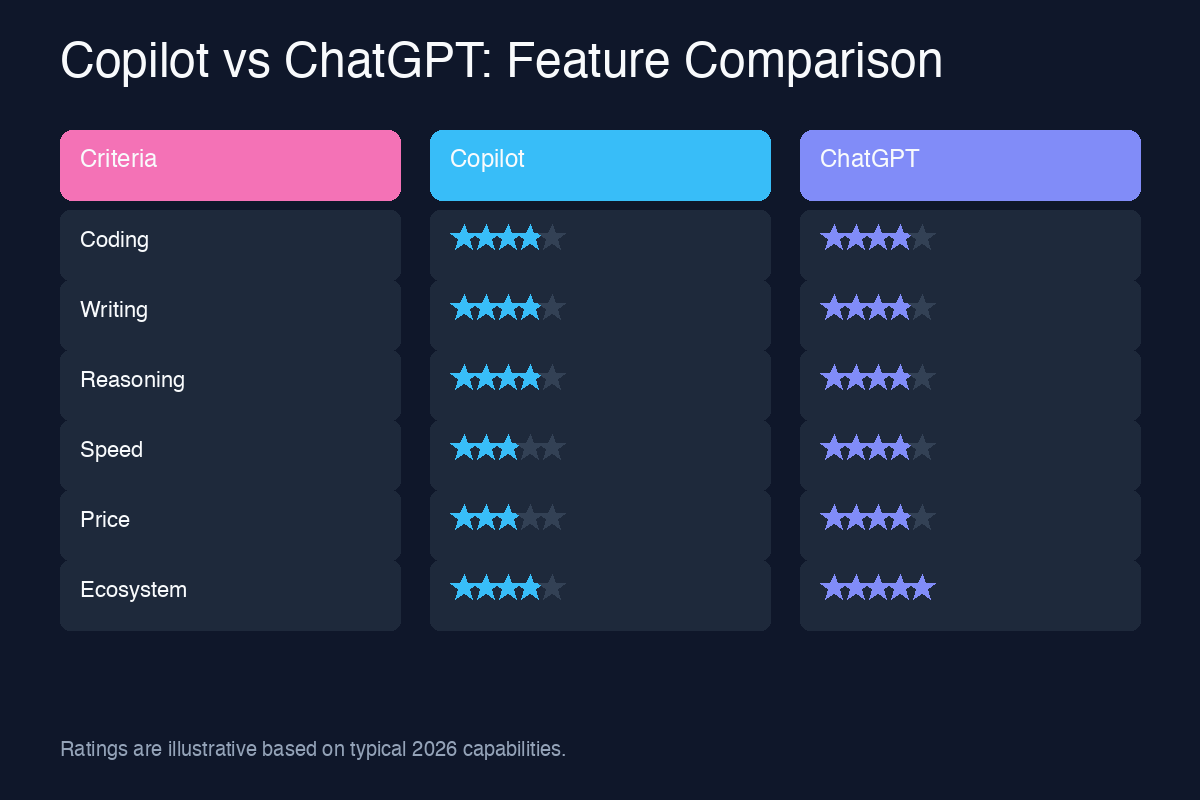
Copilot vs ChatGPT: Detailed Comparison Table
The following table summarizes the most important differences between Microsoft Copilot and ChatGPT for individual users, teams, and enterprises in 2026.
| Feature | Microsoft Copilot | ChatGPT |
|---|---|---|
| Primary maker | Microsoft | OpenAI |
| Underlying model | OpenAI GPT-4-class models plus Microsoft Prometheus and orchestration | OpenAI GPT-4o, o1, o3, and specialized reasoning models |
| Best for | Microsoft 365 users, Windows users, developers in GitHub/VS Code | General-purpose tasks, cross-platform work, custom AI workflows |
| Microsoft 365 integration | Deep native integration in Word, Excel, PowerPoint, Outlook, Teams | Limited; requires plugins, add-ins, or manual copy-paste |
| Web search | Bing-powered search with citations; available in Edge, Windows, and M365 | Browse with Bing in Plus/Team/Enterprise; source links provided |
| Coding support | GitHub Copilot is the market leader inside IDEs | Excellent for code explanation, debugging, architecture, and learning |
| Image generation | Bing Image Creator, Designer, and in-app image tools | DALL-E 3 integrated into Plus and above |
| Voice and multimodal | Voice input in Edge, Windows, and mobile apps; image understanding | Advanced voice mode, vision, file uploads, and audio |
| Enterprise security | Built on Microsoft Entra ID, Purview, Defender, and compliance frameworks | ChatGPT Enterprise/Team with SSO, admin controls, and no training on business data |
| Data privacy | Commercial data protection available; data stays within Microsoft tenant | Data controls depend on plan; API data governed by OpenAI policies |
| Pricing model | Copilot Pro, Microsoft 365 Copilot, GitHub Copilot; often bundled | Free, Plus, Pro, Team, and Enterprise tiers |
| Customization | Copilot Studio for building custom agents and workflows | Custom GPTs, GPT Store, Assistants API, and fine-tuning |
| Availability | Windows, macOS, web, Edge, iOS, Android, Microsoft 365 apps | Web, iOS, Android, macOS, Windows desktop, API |
Microsoft 365 Integration: Where Copilot Pulls Ahead
For organizations already invested in Microsoft 365, the integration advantage of Microsoft Copilot is difficult to overstate. Copilot is not a side panel you open next to Outlook; it is woven into the fabric of the apps where work already happens.
Copilot in Word
Copilot can draft documents from a prompt, rewrite sections for tone and clarity, summarize long reports, and generate content based on information in other files. For example, you can ask Copilot to "write a project proposal based on the Q2 strategy deck and the budget spreadsheet," and it will pull context from both files without you copying anything.
Copilot in Excel
Excel Copilot can analyze spreadsheets, identify trends, create charts, suggest formulas, and answer natural-language questions about your data. Instead of manually building a PivotTable, you can ask, "What are the top three drivers of revenue variance this quarter?" and receive a structured answer with supporting visuals.
Copilot in PowerPoint
Copilot transforms outlines, Word documents, and raw ideas into presentation slides. It can also reorganize slides, suggest speaker notes, and generate images to match a theme. For busy executives and consultants, this alone can save hours per week.
Copilot in Outlook
Outlook Copilot summarizes long email threads, drafts replies in your preferred tone, and helps triage an overflowing inbox. It can also pull in context from your calendar and previous messages to make responses feel personal and accurate.
Copilot in Teams
Teams Copilot is one of the most transformative enterprise AI features available today. It can summarize meetings in real time, list action items, identify who said what, and answer questions about a conversation you missed. For hybrid and distributed teams, this eliminates the need to rewatch recordings and hunt through transcripts.
ChatGPT's limitation here is structural. While ChatGPT can draft emails, analyze spreadsheets you upload, and help with presentations, it does not have native access to your live Microsoft 365 data. Any integration requires manual file uploads, browser extensions, third-party plugins, or API-based connectors, which introduces friction and security review.
Web Search and Real-Time Information
Both Copilot and ChatGPT can access current information from the web, but the experience differs.
Microsoft Copilot and Bing
Microsoft Copilot is built on Bing search infrastructure. When you ask a question, Copilot can search the live web, synthesize results, and provide citations. Because Microsoft controls the search stack, Copilot often returns tightly formatted answers with footnotes and links to sources. In Edge, Copilot can also read the page you are currently viewing and answer questions about it.
ChatGPT Browse
ChatGPT's browsing capability, available on paid plans, also uses Bing in many implementations and can retrieve current information, answer questions about recent events, and provide source links. On higher tiers, ChatGPT can perform more complex multi-step research, but browsing may still be slower or more limited than a dedicated search engine.
Verdict: For everyday quick lookups inside Windows or Edge, Copilot is more convenient. For deep research, complex queries, and follow-up reasoning, ChatGPT often provides more nuanced answers.
Coding: GitHub Copilot vs ChatGPT
Coding is one of the most important battlegrounds in the Copilot vs ChatGPT debate, and the comparison depends heavily on where you write code.
GitHub Copilot in IDEs
GitHub Copilot remains the most popular AI coding assistant for professional developers. It integrates directly into Visual Studio, VS Code, JetBrains IDEs, Vim/Neovim, and Xcode, offering real-time code suggestions as you type. Copilot can complete functions, generate boilerplate, write unit tests, explain code snippets, and help debug errors. GitHub Copilot Chat adds a conversational layer where developers can ask questions about their codebase in natural language.
The strongest advantage of GitHub Copilot is context awareness inside the editor. It sees your open files, your project structure, and your coding patterns, which makes its suggestions more relevant than a standalone chatbot.
ChatGPT for Coding
ChatGPT is less about inline completion and more about higher-level software engineering tasks. Developers use ChatGPT to:
- Explain unfamiliar code in plain English.
- Debug errors by pasting stack traces and logs.
- Architect systems and choose technology stacks.
- Generate scripts, SQL queries, and configuration files.
- Learn new languages, frameworks, and APIs.
- Convert code from one programming language to another.
ChatGPT also supports file uploads, so you can share code files, error logs, and documentation for analysis. The ChatGPT desktop app can even integrate with some IDEs for smoother workflows.
Verdict: If you want AI inside your code editor, GitHub Copilot is the better choice. If you want a general coding tutor, debugger, and architect, ChatGPT is extremely powerful. Many developers use both.
Image Generation and Design
Both platforms offer AI image generation, but the underlying engines and workflows differ.
Copilot Image Creation
Microsoft Copilot includes image generation through Bing Image Creator and Microsoft Designer. Users can create images from prompts, adjust styles, and insert generated visuals directly into Word documents, PowerPoint slides, or social media drafts. Because Designer is integrated with the Microsoft ecosystem, it is particularly useful for marketing and presentation visuals.
ChatGPT and DALL-E
ChatGPT integrates DALL-E 3, OpenAI's advanced image generation model. DALL-E 3 is known for following complex prompts accurately and producing high-quality, creative images. Within ChatGPT, you can iterate on images conversationally, asking for changes to composition, style, and content without rewriting the entire prompt.
Verdict: DALL-E 3 inside ChatGPT tends to produce more refined and creative images for general use. Microsoft Copilot's image tools are better for users who want to drop generated visuals directly into Office documents or marketing materials.
Enterprise Features and Security
For businesses, security, compliance, and administrative control are often more important than raw features.
Microsoft 365 Copilot for Enterprise
Microsoft 365 Copilot inherits the security and compliance posture of the Microsoft 365 tenant. That means:
- Authentication through Microsoft Entra ID (formerly Azure AD).
- Data stays within the organization's Microsoft 365 boundary.
- Permissions and access controls are respected automatically.
- Compliance with GDPR, HIPAA, ISO, SOC 2, and other frameworks.
- Integration with Microsoft Purview for data loss prevention and sensitivity labels.
- Microsoft Defender and Entra security signals for Copilot for Security.
For enterprises already running on Microsoft infrastructure, Copilot is often the path of least resistance because it extends existing governance rather than introducing a new shadow IT tool.
ChatGPT Enterprise and Team
OpenAI offers ChatGPT Team and ChatGPT Enterprise plans designed for business use. These plans include:
- Single sign-on (SSO) and SAML integration.
- Admin dashboards with usage analytics and member management.
- Data encryption in transit and at rest.
- OpenAI's commitment not to train on business data.
- Higher message caps and access to the latest models.
- Shared workspaces and custom GPTs for teams.
ChatGPT Enterprise is a strong option, but it requires separate procurement, user onboarding, and policy management outside of Microsoft ecosystems.
Verdict: Organizations deeply embedded in Microsoft 365 will find Copilot easier to govern. Organizations seeking a standalone AI platform with broad flexibility may prefer ChatGPT Enterprise.
Pricing Comparison in 2026
Pricing is one of the most confusing parts of the Copilot vs ChatGPT comparison because the two products are sold differently.
ChatGPT Pricing
- Free: Access to a limited version of GPT-4o with usage caps, no web browsing priority, and slower response times.
- Plus ($20/month per user): Full access to GPT-4o, advanced voice mode, browsing, DALL-E image generation, higher message limits, and custom GPTs.
- Pro ($200/month per user): Higher rate limits, priority access to new features and models, including o1 Pro mode for demanding reasoning tasks.
- Team ($25/user/month billed annually, or $30/user/month billed monthly): Shared workspace, admin controls, higher usage caps, and team collaboration features.
- Enterprise: Custom pricing with SSO, advanced analytics, and dedicated support.
Microsoft Copilot Pricing
- Copilot (free): Basic web and Windows assistance with limited usage.
- Copilot Pro ($20/month per user): Priority access to GPT-4 and GPT-4 Turbo, enhanced image generation, and integration with select Microsoft 365 Personal and Family apps.
- Microsoft 365 Copilot ($30/user/month): The full enterprise Copilot experience inside Word, Excel, PowerPoint, Outlook, Teams, and other Microsoft 365 apps. Requires a qualifying Microsoft 365 subscription.
- GitHub Copilot ($10/user/month for individuals, $19/user/month for business, $39/user/month for enterprise): AI coding assistant inside IDEs.
- Copilot for Security / Sales / Service / Azure: Custom and usage-based pricing for specialized roles.
Total Cost of Ownership
A company paying for Microsoft 365 E3 or E5 already has the base platform. Adding Microsoft 365 Copilot at $30 per user per month may feel expensive, but it replaces or augments multiple productivity tools. By contrast, ChatGPT Team is easier to adopt for small groups but does not integrate directly into Microsoft 365 workflows.
Verdict: For individuals, the two are roughly comparable at around $20 per month. For enterprises, the choice depends on existing Microsoft licensing and whether the $30 per user Microsoft 365 Copilot license delivers enough productivity gains.
When to Use Microsoft Copilot
Choose Microsoft Copilot when:
- Your organization runs on Microsoft 365 and Entra ID.
- You want AI inside Word, Excel, PowerPoint, Outlook, and Teams.
- You need meeting summaries and action items from Teams calls.
- You are a developer using GitHub, VS Code, or Visual Studio.
- You prefer AI grounded in Bing search and your organization's documents.
- Compliance, data residency, and IT governance are top priorities.
When to Use ChatGPT
Choose ChatGPT when:
- You want a flexible, cross-platform AI assistant not tied to a single vendor.
- You need advanced reasoning, long-form writing, or creative brainstorming.
- You want to build custom GPTs or integrate AI through an API.
- You work across many apps and prefer copying AI output where needed.
- You value the OpenAI ecosystem, including DALL-E and the latest model releases.
- You are a startup, agency, or individual who wants fast access to frontier models.
How Chat-Sonic Provides Access to GPT-4 and More
The Copilot vs ChatGPT debate assumes you must choose one. But modern AI users increasingly prefer not to be locked into a single model or ecosystem. That is where Chat-Sonic comes in.
Chat-Sonic is an AI model aggregator that gives users access to GPT-4, Claude, Gemini, Grok, DeepSeek, and more from a single platform. Instead of subscribing to multiple services and switching between tabs, you can pick the best model for each task, compare outputs side by side, and build a productivity workflow that combines the strengths of every major AI provider.
Why Chat-Sonic for Productivity?
- Model flexibility: Use GPT-4 for writing and coding, Claude for long-document analysis, Gemini for multimodal tasks, Grok for real-time web insights, and DeepSeek for cost-efficient reasoning.
- Single subscription: Reduce the complexity and cost of managing multiple AI accounts.
- No ecosystem lock-in: Get OpenAI-level reasoning without being forced into Copilot's Microsoft-centric interface or ChatGPT's single-provider limitations.
- Side-by-side comparisons: Run the same prompt across multiple models to see which produces the best result.
- Built for professionals: Chat-Sonic is designed for users who treat AI as a productivity stack rather than a toy.
For users torn between Copilot and ChatGPT, Chat-Sonic offers a compelling third path: keep the power of GPT-4, add the diversity of Claude, Gemini, Grok, and DeepSeek, and use whichever assistant fits the moment. Whether you are drafting a report, analyzing a spreadsheet, debugging code, or generating campaign ideas, Chat-Sonic lets you match the right intelligence to the right job.
Frequently Asked Questions
Is Copilot just ChatGPT with a Microsoft wrapper?
No. While Copilot uses OpenAI models, it adds Microsoft-specific orchestration, grounding in Bing and Microsoft 365 data, and deep integration with Windows, Office, Edge, and GitHub. The experience is meaningfully different from using ChatGPT in a browser.
Can ChatGPT access my Microsoft 365 files?
Not natively. You can upload individual files to ChatGPT for analysis, but it cannot continuously read your Outlook inbox, Teams transcripts, or SharePoint libraries the way Microsoft 365 Copilot can.
Which is better for coding: GitHub Copilot or ChatGPT?
GitHub Copilot is better for inline code completion inside an IDE. ChatGPT is better for explaining, debugging, architecting, and learning. Many developers use both tools together.
Is Microsoft 365 Copilot worth $30 per user per month?
For heavy Microsoft 365 users, the time saved on email triage, document drafting, spreadsheet analysis, and meeting summaries can justify the cost. For light users, Copilot Pro or a general tool like ChatGPT Plus may be sufficient.
Does Copilot use my data to train AI models?
With commercial data protection enabled, Microsoft does not use organizational Microsoft 365 Copilot data to train models. Always check your tenant settings and data processing terms.
Can I use ChatGPT and Copilot together?
Yes. Many professionals use Copilot for Microsoft 365 tasks and ChatGPT for general research, writing, coding help, and custom workflows. Platforms like Chat-Sonic make it even easier to use multiple models together.
Final Verdict: Copilot vs ChatGPT in 2026
The choice between Microsoft Copilot and ChatGPT is not about which AI is smarter. Both are powered by world-class models and both can dramatically improve productivity. The real question is fit.
Microsoft Copilot is the best choice for professionals and enterprises embedded in the Microsoft ecosystem. If your day revolves around Outlook, Teams, Excel, Word, PowerPoint, Windows, and Edge, Copilot's native integration, enterprise security, and context awareness are unmatched. Developers who live in GitHub and VS Code will also find GitHub Copilot indispensable.
ChatGPT is the best choice for users who want a flexible, general-purpose AI that works everywhere. It excels at writing, reasoning, coding explanations, creative projects, and custom AI workflows. Its broad platform support, large third-party ecosystem, and powerful API make it the go-to assistant for cross-platform users.
For those who refuse to choose, Chat-Sonic offers the best of all worlds. By aggregating GPT-4, Claude, Gemini, Grok, DeepSeek, and more into one platform, Chat-Sonic lets you switch models based on the task at hand, compare answers, and build a productivity stack that adapts to your workflow rather than forcing your workflow to adapt to a single vendor.
Ultimately, the smartest approach in 2026 is not to debate Copilot vs ChatGPT, but to understand what each does best, and to give yourself access to both.