

Claude Code vs Cursor: Best AI Coding Agent in 2026?
The way developers write software changed forever when AI assistants moved from novelty chatbots to genuine coding companions. In 2026, two names dominate the conversation for AI-native development: Claude Code from Anthropic and Cursor from Anysphere. Both promise to turn natural language into working code, but they approach the problem from very different angles. Claude Code is a terminal-first agent that pairs Anthropic's reasoning models with deep command-line integration. Cursor is a full fork of Visual Studio Code rebuilt around AI, offering an IDE experience with inline completions, composer windows, and multi-file editing.
If you are trying to decide which tool deserves a place in your workflow, this guide is for you. We compare Claude Code and Cursor across the dimensions that matter most to working developers: code generation quality, debugging power, refactoring ability, terminal and CLI usage, IDE integration, context awareness, pricing, and ideal use cases. We also explain how Chat-Sonic gives you access to Claude and many other leading coding models in one place, so you are never locked into a single provider.
By the end of this article, you will know whether Claude Code or Cursor is the better fit for your projects, your budget, and your preferred way of working.
Key Takeaways
- Claude Code is a terminal-based AI coding agent powered by Anthropic's Claude models. It excels at autonomous reasoning, multi-step tasks, and deep codebase understanding through a command-line interface.
- Cursor is an AI-first IDE built on top of Visual Studio Code. It is ideal for developers who want a familiar editor with powerful inline AI completions, chat, and composer-driven multi-file edits.
- Claude Code shines in agentic workflows, where it can plan, execute commands, read files, run tests, and iterate with minimal supervision.
- Cursor shines in interactive coding, where real-time suggestions, tab completion, and a visual editor improve everyday typing speed.
- Both tools support large context windows, but Claude Code tends to be stronger at complex reasoning and following detailed instructions across many files.
- Cursor offers stronger IDE integration out of the box, including extensions, themes, keybindings, and a visual debugging experience.
- Pricing differs significantly: Claude Code is typically bundled with Anthropic API or Pro subscriptions, while Cursor offers a standalone subscription with usage-based add-ons.
- Chat-Sonic lets you access Claude and other top coding models without juggling multiple accounts or API keys.
What Is Claude Code?
Claude Code is Anthropic's official coding agent. It is designed as a terminal application that runs inside your project directory and gives Claude direct access to your files, shell, and version control. Instead of copying and pasting code into a chat window, you describe what you want to build or fix, and Claude Code can read relevant files, propose edits, run tests, execute shell commands, and commit changes.
The philosophy behind Claude Code is simple: the terminal is already the natural control center for most engineering work. Developers spend their days in Git, package managers, test runners, linters, build tools, and remote servers. By placing Claude directly in that environment, Anthropic created an agent that feels like a senior engineer pair-programming with you over SSH.
Claude Code is powered by Claude's latest reasoning models, which are known for strong instruction following, careful analysis, and a conservative approach to making changes. It tends to ask clarifying questions before rewriting large sections of code and is generally reluctant to introduce unnecessary complexity. That makes it especially useful for legacy codebases, production systems, and tasks where correctness matters more than speed.
Core Features of Claude Code
- Terminal-native interface: Runs in your shell with no separate IDE required.
- File and codebase access: Can read, search, and edit files across your entire project.
- Shell command execution: Can run tests, install dependencies, build projects, and interact with Git.
- Agentic task execution: Handles multi-step workflows by planning, acting, and iterating.
- Git integration: Can stage changes, create commits, and summarize diffs.
- Large context window: Supports long conversations and broad codebase awareness.
- Reasoning-first model: Strong at debugging, architecture decisions, and refactoring.
What Is Cursor?
Cursor is an AI-powered code editor built by Anysphere. It is a fork of Visual Studio Code, which means it looks and feels like the editor millions of developers already use every day. Cursor adds AI features directly into the editor experience, including inline code completion, an AI chat sidebar, a composer window for multi-file edits, and natural language command execution.
Where Claude Code aims to replace the chat-to-IDE workflow with a terminal agent, Cursor aims to make the IDE itself intelligent. You open Cursor the same way you open VS Code, import your settings and extensions, and immediately get AI features layered on top. For developers who do not want to leave their editor, Cursor offers the smoothest possible integration.
Cursor supports multiple underlying models, including Claude, GPT-4o, o3-mini, and others. This flexibility means you can choose the model that best fits the task, whether you need fast autocompletion or deep reasoning. Cursor's real strength is in reducing friction during everyday coding: accepting a suggestion with Tab, asking the chat to explain a function, or using the composer to refactor a component across several files.
Core Features of Cursor
- VS Code-based IDE: Familiar interface with full extension and theme support.
- Inline completions: AI-powered Tab suggestions that predict the next edit.
- AI chat sidebar: Ask questions, get explanations, and request changes without leaving the editor.
- Composer: Multi-file editing canvas for larger changes and feature implementation.
- Natural language editing: Select code and describe the change you want.
- Model flexibility: Switch between Claude, GPT, and other models depending on the task.
- Visual debugging: Runs in a full IDE with breakpoints, terminals, and integrated tools.
Claude Code vs Cursor: Side-by-Side Comparison
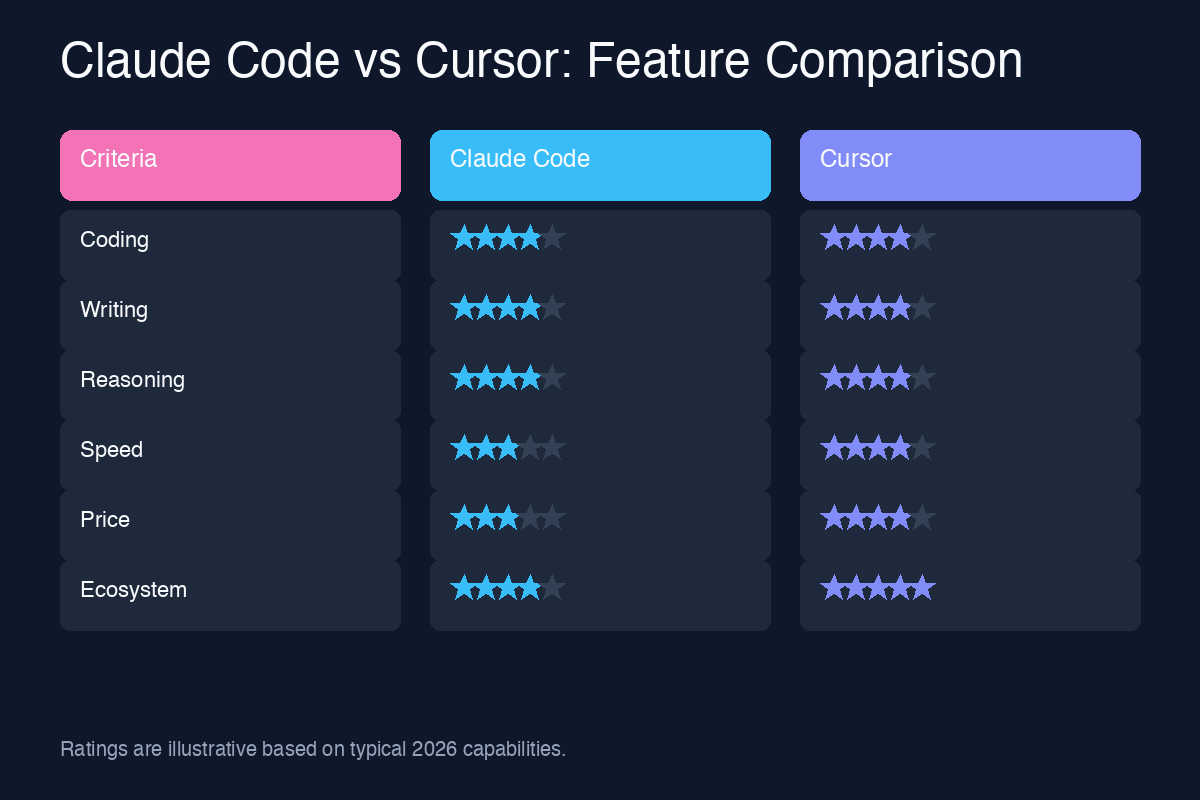
The following table summarizes how Claude Code and Cursor compare across the most important categories for AI-assisted development.
| Feature | Claude Code | Cursor |
|---|---|---|
| Interface | Terminal and command-line agent | Visual Studio Code fork with GUI |
| Primary Model | Anthropic Claude | Claude, GPT-4o, o3-mini, and others |
| Code Generation | Excellent for multi-file, instruction-driven generation | Excellent for inline and real-time completion |
| Debugging | Strong reasoning, can run tests and inspect output | Strong with visual breakpoints and chat explanations |
| Refactoring | Excellent for large-scale, cross-file refactoring | Excellent for component and function-level refactoring |
| Terminal/CLI Usage | Native and deeply integrated | Built-in terminal panel, but not agent-first |
| IDE Integration | Limited; works alongside any editor | Full IDE with extensions, debugger, and UI |
| Context Awareness | Very large context, strong codebase understanding | Good context with @-mentions and embeddings |
| Agentic Autonomy | High; can plan and execute multi-step tasks | Moderate; more interactive and user-guided |
| Pricing | Anthropic Pro or API usage | Standalone subscription with usage tiers |
| Best For | Terminal-first developers, complex tasks, legacy systems | GUI-first developers, daily coding, fast iteration |
Code Generation
Code generation is the most obvious place to compare Claude Code and Cursor, and both tools are impressive. The difference lies in how they generate code and how much guidance they need.
Claude Code for Code Generation
Claude Code generates code through conversation. You describe the feature you want, and it explores the codebase, identifies the files that need to change, proposes edits, and asks for confirmation. This makes it especially powerful for greenfield features and architectural changes that span multiple files.
Because Claude Code is powered by Claude's reasoning models, it tends to generate code that is well-structured, well-commented, and aligned with existing patterns. It will often read your existing tests, package.json, or README to understand conventions before writing new code. If it encounters ambiguity, it asks rather than guessing.
The trade-off is speed. Claude Code is not optimized for typing one line at a time. It is optimized for completing whole tasks. If you want a function written, a component scaffolded, or an endpoint added, Claude Code can handle it end to end.
Cursor for Code Generation
Cursor generates code in two ways. First, its inline completion predicts what you are about to type and surfaces suggestions as you edit. This is similar to GitHub Copilot but often feels more context-aware because Cursor indexes your entire codebase. Second, the Composer and chat interfaces let you request larger blocks of code or multi-file changes using natural language.
Cursor is faster for everyday edits. When you are in flow, accepting Tab suggestions and making small chat requests keeps your hands on the keyboard and your eyes in the editor. For larger tasks, Cursor's Composer can generate multiple files at once, though it generally requires more hand-holding than Claude Code for truly complex changes.
Which Is Better?
Choose Claude Code when you want to delegate an entire feature or task and come back to a working result. Choose Cursor when you want AI to accelerate your typing and help you stay in the zone while you code interactively.
Debugging
Debugging is where AI coding assistants prove whether they are toys or tools. A tool that writes pretty code but cannot find bugs is not useful in production. Both Claude Code and Cursor take debugging seriously, but their approaches differ.
Claude Code for Debugging
Claude Code approaches debugging like a methodical engineer. You paste an error message or describe a problem, and it reads the relevant files, traces the execution path, and proposes hypotheses. Because it can run shell commands, it can execute tests, inspect logs, check environment variables, and verify whether a fix works.
This ability to act in the environment makes Claude Code unusually effective for runtime issues. It can reproduce a bug by running the application, observe the failure, modify the code, run the test again, and iterate until the issue is resolved. For flaky tests, deployment issues, and integration problems, this agentic loop is a major advantage.
Cursor for Debugging
Cursor's debugging power comes from the combination of a full IDE and AI chat. You can set breakpoints, inspect variables, step through code, and then ask the AI to explain what is happening. If you highlight an error message, Cursor can suggest fixes directly in the editor.
Cursor is particularly strong for frontend and application debugging, where visual inspection and step-through debugging matter. Its integration with VS Code's debugger means you can work with Node.js, Python, Go, Rust, and many other languages using familiar tooling.
Which Is Better?
Claude Code is better for deep, systemic debugging where running commands and reasoning across the codebase matters. Cursor is better for interactive debugging inside a visual IDE, especially for applications with rich runtime state.
Refactoring
Refactoring is one of the highest-value use cases for AI coding tools. Renaming variables, extracting functions, migrating APIs, and restructuring modules are tedious but critical. Both Claude Code and Cursor handle refactoring well, but at different scales.
Claude Code for Refactoring
Claude Code excels at large-scale refactoring. You can ask it to migrate an entire API, rename a concept across dozens of files, or restructure a project to follow a new pattern. Because it has access to the whole repository and can run tests after each change, it can manage refactoring as a project rather than a series of isolated edits.
Claude Code is also cautious. It will often present a plan before making sweeping changes and will run your test suite to verify that nothing breaks. This makes it a good choice for production codebases where regressions are expensive.
Cursor for Refactoring
Cursor makes refactoring feel effortless at the file and function level. You can highlight a block of code and ask the chat to extract it into a function, add types, or modernize syntax. The Composer can apply changes across multiple files, and Cursor's understanding of your codebase helps it maintain consistency.
Cursor is less autonomous than Claude Code for massive refactoring projects, but it is faster and more interactive for the kinds of refactoring developers do every hour: renaming, extracting, simplifying, and formatting.
Which Is Better?
For enterprise-scale refactoring across many files and modules, Claude Code has the edge. For daily refactoring inside a single file or component, Cursor is faster and more convenient.
Terminal and CLI Usage
The terminal is the control center of modern software development. Whether you are running a local server, deploying to production, or querying a database, command-line fluency is essential. This is where Claude Code and Cursor diverge most clearly.
Claude Code in the Terminal
Claude Code lives in the terminal. It can run shell commands, manage Git, install packages, run tests, and interact with cloud services. This is not a side feature; it is the core experience. When you ask Claude Code to add a feature, it can create files, install dependencies, update configuration, run the build, and verify the output.
For DevOps-heavy workflows, backend development, and infrastructure tasks, this terminal integration is invaluable. You can ask Claude Code to debug a failing deployment, update a Terraform configuration, or refactor a Python script on a remote server. It understands the context of the shell and can chain commands together.
Cursor in the Terminal
Cursor includes an integrated terminal panel, just like VS Code. You can open a terminal inside the editor and run commands manually. Cursor can also generate terminal commands from natural language and explain command output.
However, Cursor is not a terminal-first agent. The terminal is one panel among many, and the AI does not automatically run commands as part of a larger plan. You remain the operator. For many developers, this is a comfortable middle ground. For others, it feels slower than Claude Code's autonomous approach.
Which Is Better?
If your workflow is terminal-centric, Claude Code is the natural choice. If you prefer a GUI editor with terminal access when needed, Cursor is the better fit.
IDE Integration
IDE integration determines how smoothly an AI tool fits into your existing setup. Some developers want a dedicated environment; others want an assistant that works alongside their favorite editor.
Claude Code and IDE Integration
Claude Code is editor-agnostic. It runs in the terminal and can work alongside VS Code, Neovim, JetBrains, Xcode, or any other editor. You can keep your existing setup and invoke Claude Code when you need help. This is ideal for developers with highly customized environments.
The downside is that Claude Code does not provide inline completions inside your editor. You do not get the Tab-to-accept experience that Cursor offers. Instead, you switch between your editor and the terminal, which can interrupt flow for some users.
Cursor as an IDE
Cursor is an IDE. It is a complete development environment with syntax highlighting, IntelliSense, debugging, source control, extensions, themes, and keybindings imported from VS Code. If you already use VS Code, switching to Cursor is almost frictionless.
Because Cursor is the IDE, the AI is always present. You do not need to open a separate tool or context-switch. The chat, composer, and completions are always a keystroke away. This tight integration is Cursor's biggest selling point.
Which Is Better?
Cursor wins for IDE integration because it is an IDE. Claude Code wins for flexibility because it works with any editor. Your preference depends on whether you want an all-in-one environment or a modular workflow.
Context Awareness
Context awareness is what separates helpful AI assistants from glorified autocomplete. A coding agent needs to understand your project structure, conventions, dependencies, and goals to generate useful code.
Claude Code Context Awareness
Claude Code has direct access to the filesystem and can read any file in your project. It builds context by searching, reading, and asking questions. With support for very large context windows, it can hold substantial portions of a codebase in memory during a conversation.
Claude Code is also good at identifying relevant files automatically. When you ask it to fix a bug, it does not just guess. It searches for references, reads tests, and inspects configuration files to build a complete picture before proposing a fix.
Cursor Context Awareness
Cursor uses a combination of codebase indexing, embeddings, and user prompts to manage context. You can use @-mentions to reference files, symbols, or documentation in the chat. Cursor indexes your project so it can retrieve relevant snippets quickly.
Cursor's context system is excellent for typical projects, but it can require more explicit guidance for very large or unusual codebases. The @-mention system gives you control, but you need to know what to reference.
Which Is Better?
Claude Code generally has stronger autonomous context gathering, especially for large and complex repositories. Cursor gives you powerful tools to manage context manually, which many users prefer.
Pricing
Pricing is always a practical consideration. Both tools offer significant value, but their cost structures are different.
Claude Code Pricing
Claude Code is typically accessed through Anthropic's subscription plans or API billing. Depending on your plan, you may have a monthly usage allowance or pay per token for model requests. Because Claude Code can run many model calls during a single task, costs can add up for heavy users.
The value proposition is that Claude Code can complete complex tasks with fewer prompts. If it can implement a feature or fix a bug in one conversation that would have taken hours manually, the cost is easy to justify. However, users should monitor usage, especially when running agentic tasks that invoke the model repeatedly.
Cursor Pricing
Cursor offers a standalone subscription with tiered usage. The base plan includes a generous allocation of fast requests and unlimited slow requests for completions and chat. Higher tiers add more fast requests, priority access, and advanced models.
Cursor's pricing is predictable for most developers. You pay a flat monthly fee and know roughly how many fast requests you get. If you exceed the limit, you can still use the tool with slower responses. This makes it easier to budget than pure usage-based pricing.
Which Is Better?
For developers who want predictable monthly costs, Cursor is usually simpler. For teams that value task completion over token counting, Claude Code can be more cost-effective at the project level. Both offer free trials or limited free tiers, so the best approach is to test each tool against your actual workflow.
Best Use Cases
Neither tool is universally better. The right choice depends on what you build, how you work, and what you value.
When to Choose Claude Code
- You spend most of your day in the terminal and prefer shell-driven workflows.
- You work on backend systems, DevOps, infrastructure, or complex codebases.
- You want an agent that can plan and execute multi-step tasks autonomously.
- You need deep reasoning for debugging, architecture, or refactoring.
- You already have a preferred editor and do not want to switch.
- You value careful, conservative changes over speed.
When to Choose Cursor
- You want an AI-powered version of Visual Studio Code.
- You value inline completions and Tab-driven coding speed.
- You work on frontend applications, full-stack web development, or interactive projects.
- You prefer visual debugging and an integrated development environment.
- You want predictable monthly pricing.
- You like switching between multiple models for different tasks.
How Chat-Sonic Gives You Access to Claude and More
Choosing between Claude Code and Cursor is not the only decision developers face in 2026. The broader challenge is accessing the best AI models for each task without managing multiple subscriptions, API keys, and billing dashboards. That is where Chat-Sonic comes in.
Chat-Sonic is an AI model aggregator that gives you access to Claude, ChatGPT, Gemini, DeepSeek, Grok, and many other leading models from a single platform. Instead of paying for Anthropic, OpenAI, Google, and xAI separately, you can use Chat-Sonic to compare models, switch between them, and choose the right intelligence for each task.
For developers, this is especially powerful. You might use Claude for careful refactoring, GPT-4o for fast prototyping, and a smaller model for lightweight completions. Chat-Sonic lets you do all of this without juggling accounts. You can test how different models handle the same prompt, discover which one works best for your codebase, and avoid vendor lock-in.
Chat-Sonic also simplifies billing and access. There is no need to set up API keys for every provider or track usage across multiple dashboards. You get one subscription, one interface, and access to a growing ecosystem of models. Whether you are building production software, learning to code, or managing a team of engineers, Chat-Sonic makes it easier to put the best AI to work.
If you are comparing Claude Code and Cursor because you want better AI-assisted coding, consider starting with Chat-Sonic. It gives you the freedom to explore the models behind these tools and many others, all in one place.
Final Verdict
Claude Code and Cursor represent two compelling visions for the future of AI-assisted development. Claude Code is the terminal agent for developers who want deep reasoning, autonomous execution, and full control over their environment. Cursor is the AI-native IDE for developers who want speed, visual tooling, and a seamless editor experience.
In 2026, both tools are excellent. The best choice depends on your workflow. Terminal-first engineers will likely prefer Claude Code. Editor-first engineers will likely prefer Cursor. Teams may even use both: Cursor for daily feature work and Claude Code for complex debugging, refactoring, and infrastructure tasks.
The most important takeaway is that AI coding tools are no longer optional. They are becoming as essential as version control and code review. Whether you choose Claude Code, Cursor, or both, the developers who learn to work with AI agents will outpace those who do not. And with platforms like Chat-Sonic, you do not have to bet on a single model or provider. You can use the best tool for every job.
Start by testing both Claude Code and Cursor on a real project. Pay attention to which one feels natural, which one produces better code, and which one saves you more time. The answer will depend on your codebase, your team, and your preferences. The good news is that in 2026, you have better options than ever before.